Introduction to CSS
CSS stands for Cascading Style Sheets.We are familiar that webpages are created using Html language which gives the facility to design in our way. Similarly, when it comes to presentation of the content and it's suppliments css comes under play.

CSS uses rulesets for basic styling of a document. It follows a cascading style rule hierarchy, where multiple style rules can be applied to the same HTML element. Based on specifications and order the precedence is given. This feature makes easy to use reusable styles. CSS provides multiple selectors based on similarities between elements and enable specific properties to a group of elements. This feature makes users to create more precise webpages. CSS provides techniques like graphical elements, animations, transitions, and transformations.
Syntax
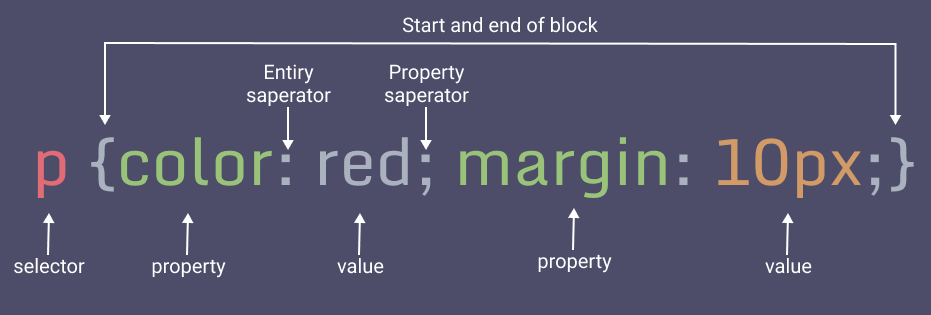
- Selector: Selector represents the html element which we need to style .
- Declaration block: This block contains one or more than one declarations seperated by semicolons(;) .
- Each declaration consists of property and value differentiated by colon(:).
Specific properties have specific values indicated in different parameters.
CSS syntax consists of a selector and a declaration block.
Types Of CSS
There are few types of CSS which have specific purpose. We can use combination of these types based on requirements and user comfort.
- External CSS
- Internal CSS
- Inline CSS
- Embedded CSS
- Imported CSS
External CSS
In external CSS , multiple html documents can link to the same external CSS file. It is used when we want to change multiple documents at a time. Html documents are linked using tag placed in the head section. These files are stored with . css extension.

Internal CSS
Internal CSS is specified in the head section of html document using style tag. It is used to add a unique style to a single document. It is more organised than inline CSS and provides seperation of concerns. Sometimes it becomes difficult to handle in large projects.

Inline CSS
We can add the style attributes directly to the html elements. By placing the css code within the html tags by applying style attribute , we can create inline CSS. The style attribute is followed by equal to symbol (=) and we specify the declarations according to the CSS syntax within quotes(" ").

Embedded CSS
Embedded CSS allows you to style for a particular html document. It is included in the style tags in the html document. Similar to inline CSS it allows specification within the html elements or in the head section. It is used when generating html dynamically.
Imported CSS
Imported CSS use the "@imported" rule within a style block or external file to import a style into another style sheet. It enables you to add style rules from one file to another and combining multiple files into one CSS file.
CSS features
-
CSS saves time:
You can write CSS once and reuse the same sheet in multiple HTML pages. -
Selectors:
Selectors can be based on element types, classes, IDs, attributes, or even the relationship between elements. This flexibility gives developers powerful tools to style their pages precisely as desired. -
Easy Maintenance:
To make a global change simply change the style, and all elements in all the webpages will be updated automatically. -
Pre built styles:
Frameworks like Bootstrap and Sass provide pre built style which enables functionality and productivity. -
Dynamically accessed:
CSS can be dynamically built using embedded CSS. -
Style rule hierarchy:
CSS follows cascading style rule to implement multiple style rules to the same html element. -
Offline Browsing:
CSS can store web applications locally with the help of an offline cache. Using this we can view offline websites.

Overall, CSS is a crucial technology in web development which plays a major role in shaping and presenting the visual elements to create expressive and attractive web applications.
Comments
Post a Comment